
Published by FutureTecEra

Using an AI assistant for research or learning can be practical, but it can also create confusion when a clear question is missing. A beginner may receive a polished answer, a seemingly relevant summary, or a list of references without knowing which parts are accurate, which parts require checking, and which parts are only a starting point for further investigation.
This is why the comparison of ChatGPT vs Perplexity vs Gemini deserves a careful and practical approach. These tools may all support questions, explanations, summaries, and research preparation, but the quality of the final result still depends on how the user defines the task, examines the output, checks supporting sources, and decides what can be used responsibly.
A student may want support in understanding an unfamiliar subject. A blogger may need to prepare a source-aware article outline. A creator may want to organize reviewed information before adapting it into a clearer format. An independent learner may simply want to explore a topic without confusing a generated answer with reliable evidence.
In each of these cases, the practical question is not: Which assistant should be treated as automatic proof? A clearer question is: Which assistant supports this particular task while keeping verification, context, and final judgment in my hands?
In this practical guide from FutureTecEra, we will examine ChatGPT vs Perplexity vs Gemini through research preparation, learning support, source review, summarization, and the responsible development of content from information that has been checked. The goal is not to announce a universal winner. The goal is to give readers a workflow they can understand, evaluate, and refine over time.
You will learn how to:
- Define a research or learning task before asking an AI assistant for support
- Compare ChatGPT, Perplexity, and Gemini using the same question and review criteria
- Separate topic exploration from evidence-based verification
- Review source links and important claims before using an output
- Turn reviewed notes into a practical outline or explanation without losing accuracy
- Use AI assistance as part of a human-led research and learning process
New to AI and looking for a clear foundation?
Before comparing research assistants, it is practical to understand the habits that make AI-supported work more reliable: defining a purpose, reviewing outputs, checking important information, protecting privacy, and keeping your own judgment visible.
Why Comparing ChatGPT vs Perplexity vs Gemini Requires a Source-Aware Method
AI assistants can make information feel easier to access. They may provide explanations, organize ideas, summarize supplied material, suggest questions, or support users in identifying areas worth investigating. However, an accessible answer is not automatically a verified answer, and a fluent summary is not automatically suitable for publication, study, or decision-making.
This distinction is especially important when comparing ChatGPT vs Perplexity vs Gemini. A user may be impressed by an answer that arrives quickly or appears well organized. Yet the more important evaluation begins after the response appears: Does it address the question clearly? Does it distinguish confirmed information from interpretation? Does it provide material that can be checked? Does it introduce claims that require further review?
A source-aware method does not mean distrusting every AI-assisted response. It means treating each output according to its purpose. A brainstorming suggestion can support exploration of a direction. A simplified explanation can support identifying what you do not yet understand. A summary may support the organization of notes. But any important claim, recent detail, quotation, statistic, product feature, or public-facing statement should be checked before it is relied upon.
Research Assistance Is Not the Same as Verified Evidence
Research usually involves more than receiving an answer. It involves identifying a question, finding relevant material, examining sources, noticing uncertainty, comparing perspectives, and deciding which information is sufficiently supported to inform a conclusion.
An AI assistant may support several parts of this process, but it should not remove the need for inspection. A response that refers to sources still requires the user to open and assess those sources. A response that explains a topic clearly may still omit context. A response that appears current may still require confirmation before it is used in an article or learning resource.
For beginners, this is a practical habit to develop early: treat AI as assistance for navigating information, not as automatic proof that the information has been verified.
Learning Support and Research Review Are Related but Different
A learner may use an assistant to understand a concept in simpler language, prepare questions, identify unfamiliar terms, or compare two definitions. These are valuable educational uses because they support the learner in deciding what to examine next.
Research review goes further. It asks whether the explanation is supported, whether the referenced material is appropriate, whether recent information remains current, and whether any important detail has been overlooked. A practical workflow can include both learning support and research review, but the user should understand that they are not identical tasks.
This is one reason a calm comparison matters. Rather than expecting ChatGPT, Perplexity, or Gemini to complete every research or learning task automatically, the reader can identify what kind of support is needed and what kind of checking still remains necessary.
The Same Assistant May Be Tested for More Than One Purpose
It is tempting to assign each platform one permanent role: one for research, one for writing, and one for quick questions. However, this can oversimplify the comparison. Features may change, interfaces may develop, and different users may find different tools easier to review for the same task.
A more practical approach is to test the assistants with a defined purpose. For example, a user may ask each one to suggest research questions for a topic, summarize supplied notes, explain a concept for a beginner audience, or identify claims that should be checked before writing.
The comparison then becomes grounded in real outputs rather than broad assumptions. The user can evaluate clarity, source visibility, relevance, ease of review, and whether the assistant supported progress on the task without encouraging overreliance.
| Research or Learning Need | AI Assistance to Test | Human Review Required |
|---|---|---|
| Understand a new topic | Request a plain-language explanation and key terms to investigate. | Check definitions, missing context, and important claims. |
| Begin source exploration | Ask for possible sources, questions, or evidence paths to examine. | Open sources, assess relevance, and confirm what they actually state. |
| Organize reviewed notes | Arrange supplied notes into themes, headings, or a short outline. | Confirm that meaning and evidence remain accurate. |
| Prepare public-facing content | Develop a draft from information already reviewed by the user. | Review accuracy, tone, originality, and suitability before publishing. |
Define the Task Before You Compare AI Research Assistants
A fair comparison begins before any answer is generated. If one assistant receives a broad request, another receives detailed notes, and a third receives a carefully limited research question, the resulting outputs cannot be compared meaningfully.
The clearer approach is to prepare one task and apply the same expectations to each assistant you choose to test. This keeps the focus on practical value and review rather than on vague impressions about which platform seems more impressive.
Choose a Question You Can Examine Carefully
A good first task should be specific enough to review and limited enough to manage. For instance, a learner may ask for the main questions to investigate before studying a topic. A blogger may supply several confirmed notes and request a structured outline. A creator may ask for a short summary based only on material already reviewed.
An unclear comparison begins with an open-ended request such as “Tell me everything about this subject.” A clearer comparison begins with a purpose, a defined output, and a reminder that important statements should be identified for checking.
Example Research Comparison Brief
I am preparing a beginner-friendly overview of a digital topic. Suggest five questions I should investigate, explain why each question matters, and identify any claims that would require reliable sources before I use them in an article.
This brief does not ask the assistant to produce a final article. It asks for a reviewable starting point that keeps the user responsible for further research.
Use the Same Input and the Same Review Questions
When comparing ChatGPT vs Perplexity vs Gemini, keep the input consistent. Use the same topic, the same supplied notes when relevant, and the same requested format. Then assess each output through the same questions.
This approach does not require a technical benchmark. It simply prevents the comparison from becoming unfair or unclear. A beginner can learn a great deal by observing which response stays closest to the task, which one makes uncertainty visible, which one identifies material to check more clearly, and which one is clearest to revise.
| Review Criterion | Question to Ask | Why It Matters |
|---|---|---|
| Relevance | Does the response address the research or learning task I provided? | A focused answer is easier to assess and refine. |
| Clarity | Can I understand the explanation and identify its main points? | Clear output supports learning and careful review. |
| Source Awareness | Does the response show what should be sourced or checked? | Research quality depends on inspecting evidence, not only reading summaries. |
| Verification Need | Which statements require confirmation before I rely on them? | Important claims should not pass into final work unchecked. |
| Practical Use | Can I use this response as a responsible starting point for further work? | Practical assistance should support the next human decision. |
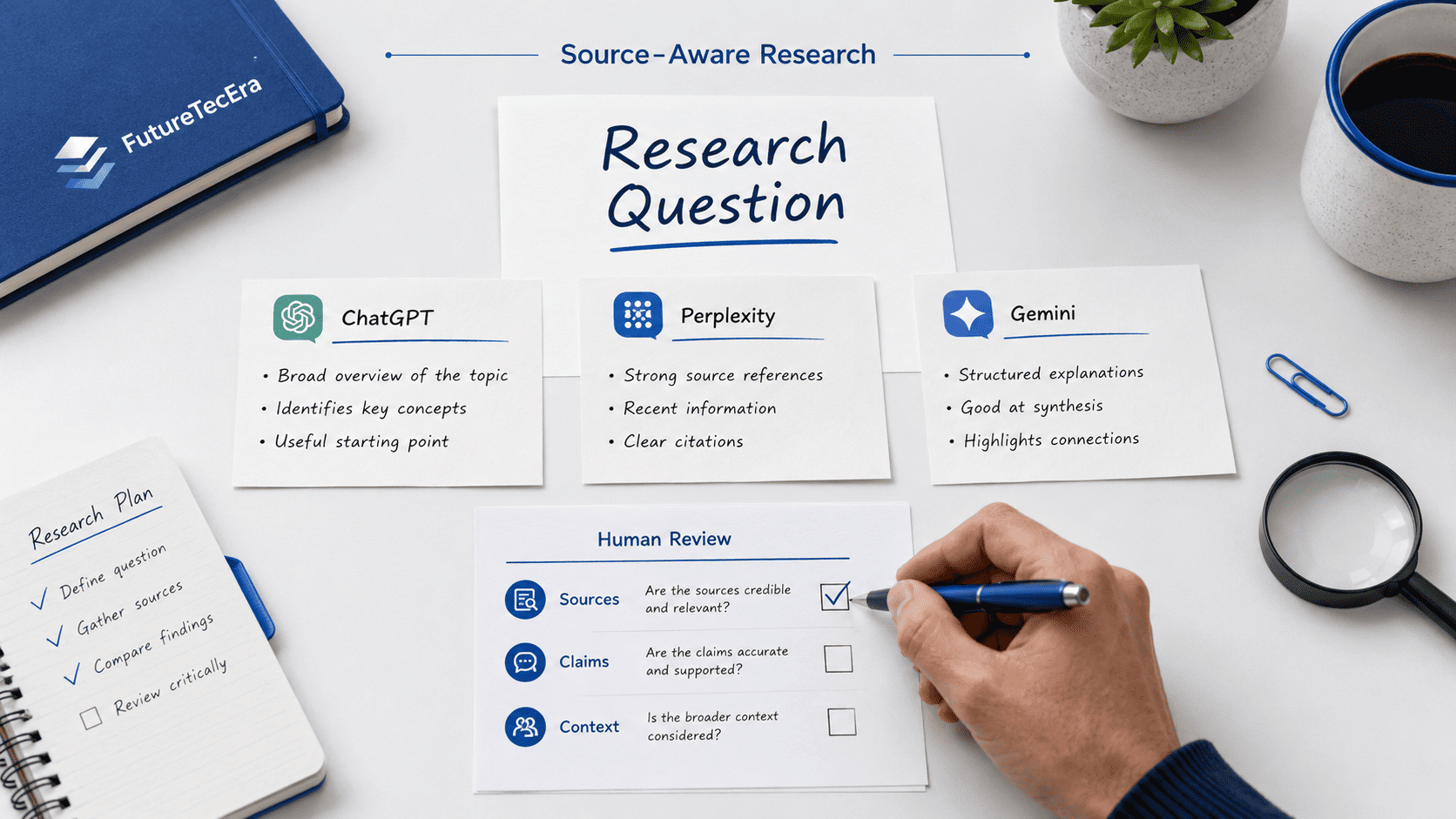
A Neutral Starting Snapshot for ChatGPT, Perplexity, and Gemini
At the beginning of a comparison, it is more careful to avoid assigning fixed winners or permanent roles to the three assistants. Instead, you can test each platform for the same kinds of reviewable tasks and observe which output is most suitable for your immediate purpose.
For example, each assistant can be tested for question preparation, explanation of a beginner topic, organization of supplied notes, or identification of claims that require further checking. The point is not to assume in advance that one tool must always be more suitable for one task than another. The point is to make your evaluation visible and responsible.
| Assistant to Test | Practical Test Prompt | Output to Examine | User Responsibility |
|---|---|---|---|
| ChatGPT | Ask for research questions or an outline based on supplied notes. | Clarity of structure, relevance, and claims marked for checking. | Verify information and revise before further use. |
| Perplexity | Ask for a topic overview and material worth examining further. | Suggested sources, context, and whether references address the question. | Open, assess, and confirm source material directly. |
| Gemini | Ask for an explanation, question list, or organized summary of provided notes. | Practical value, clarity, and any details requiring verification. | Review the output and confirm important information independently. |
This neutral snapshot gives readers a starting framework for exploring ChatGPT vs Perplexity vs Gemini without turning the article into a ranking contest. The most suitable assistant for a task is the one whose output allows you to proceed carefully, understand what requires checking, and retain control of the final work.
What This Comparison Will Examine Next
The remainder of this guide will examine how AI assistants can support several connected but distinct activities: beginning a research question, locating and reviewing source paths, learning a complex topic, summarizing information, and preparing content from material that has already been checked.
Throughout the comparison, the focus will remain on practical review rather than fixed claims. Readers should not need to depend on a universal ranking to decide what is appropriate. They should be able to identify the task, test an assistant, inspect the output, verify what matters, and choose the next action responsibly.
This approach keeps the comparison relevant even as tools and interfaces change. More importantly, it keeps research quality, learning value, and content reliability grounded in human judgment rather than in the appearance of certainty.
Testing ChatGPT, Perplexity, and Gemini for Research Preparation
Once a reader has defined a clear research or learning task, the next question is practical: how can ChatGPT, Perplexity, and Gemini be tested without assuming in advance that one assistant must always be the correct choice?
A responsible comparison does not begin by assigning permanent roles to the tools. It begins by selecting one activity that can be examined carefully. For example, you may ask each assistant to suggest questions for investigating a topic, explain an unfamiliar concept for a beginner audience, organize supplied notes into themes, or identify claims that would need confirmation before publication.
This method keeps the comparison grounded in the user’s actual need. It also prevents a common problem: accepting broad opinions about a platform without observing whether its response is genuinely practical for your task, your level of knowledge, and your ability to review the output.
Test the Same Research Question in Each Assistant
The clearest way to compare ChatGPT vs Perplexity vs Gemini is to use the same research question, the same context, and the same requested format. A user who changes the question each time will be comparing different tasks rather than comparing the practical value of the assistants.
Suppose you are preparing a beginner-friendly article about a digital topic. Instead of requesting a complete draft, you might ask each assistant to prepare a small research starting point: five questions to investigate, a short explanation of why those questions matter, and a note identifying which claims would require reliable confirmation.
The value of this test is not that it automatically selects a winner. The value is that it allows you to see how each response handles focus, clarity, uncertainty, source awareness, and the difference between a relevant direction and a final conclusion.
Research Test Prompt
I am learning about a digital topic for a beginner-friendly explanation. Suggest five focused questions I should investigate, explain why each question matters, and mark any claims that would need reliable sources before I use them publicly.
The purpose of this prompt is not to produce final content. It is to generate a reviewable research starting point that the user can inspect and refine.
Compare the Quality of the Research Direction
A practical assistant response should move you from a broad topic toward clearer investigation. It may identify relevant questions, distinguish central ideas from minor details, or show where further checking is necessary. However, a response that simply sounds confident or includes many details is not automatically a clearer research aid.
When reviewing outputs, consider whether the suggested questions are specific enough to investigate, whether they match your actual purpose, and whether they encourage careful confirmation rather than quick assumptions. A beginner should be able to understand why a direction matters before spending time developing it further.
| Area to Compare | What to Look For | Warning Sign |
|---|---|---|
| Focus | Questions clearly related to your defined topic and audience. | Broad suggestions that move away from the task. |
| Clarity | Language you can understand and later explain in your own words. | Complex phrasing that hides what should actually be checked. |
| Research Value | Directions that point toward relevant material to examine. | Statements presented as conclusions without support. |
| Verification Awareness | Clear indication of facts, dates, claims, or comparisons needing confirmation. | No distinction between explanation and evidence. |
Exploring a Topic Without Treating an AI Answer as Evidence
AI assistants can be practical at the beginning of a research process. They may support clarifying vocabulary, suggesting questions, summarizing supplied notes, or identifying related ideas that deserve attention. These activities can make the beginning of an unfamiliar subject easier to manage.
However, exploration is different from verification. An AI-generated explanation can serve as a practical guide to what you should study next, but it does not replace reading reliable material, checking current facts, or confirming what a cited source actually says.
This distinction is central to a responsible ChatGPT vs Perplexity vs Gemini comparison. The assistant that supports a clear beginning for a topic may be practical even if you still need additional work before using any information in an article, presentation, educational resource, or public post.
Use an Overview to Identify What Needs Investigation
A topic overview can support a beginner in seeing the main terms, possible angles, and unresolved questions within a subject. For example, a response may divide a topic into background, current applications, limitations, and questions for further study.
The correct next action is not automatically copying that overview into final content. The clearer action is to mark which ideas need confirmation, which terms require clearer definitions, and which points may become relevant only after reliable material has been examined.
Separate Explanatory Support from Factual Evidence
An assistant may explain a concept in simple language while still leaving important questions unanswered. A beginner should distinguish between wording that aids understanding and evidence that supports a factual claim.
For instance, a simplified explanation may support learning the basic idea of a topic. But statements about dates, scientific findings, product capabilities, official policies, statistics, or current developments require separate confirmation before they are relied upon.
| Output Type | How It May Support the Task | What Still Requires Human Work |
|---|---|---|
| Topic overview | Shows possible themes and vocabulary to explore. | Confirm key definitions and factual details. |
| Research question list | Supports the structure of further investigation. | Decide which questions are relevant and answerable. |
| Source suggestions | Points toward material that may deserve inspection. | Open, read, evaluate, and confirm the source directly. |
| Summary of notes | Organizes information you already supplied. | Check that meaning and context were preserved. |
Source Visibility and Verification: What Readers Should Check
A major reason readers explore ChatGPT vs Perplexity vs Gemini is the need to work with information more carefully. When an assistant provides a summary, mentions evidence, or displays source links, the user may feel more confident about the response. Yet confidence should come from inspection, not from appearance alone.
A visible citation or suggested link can make a workflow easier to examine, but it does not prove that the source supports every statement in the response. A source may be relevant only to one claim. It may be outdated, incomplete, secondary, or presented without important context. The user still needs to open the material and evaluate it directly.
For learners and content creators, this principle is essential. It prevents a convenient summary from being confused with evidence and keeps it clear that material used in public-facing work has been read and checked appropriately.
A Source Link Is a Review Starting Point
When an AI assistant provides a link or refers to a source, treat that information as the beginning of a review process. Open the source, identify who published it, check whether it is current enough for your topic, and confirm whether it supports the claim you intend to use.
This matters even for a source that appears credible at first glance. A reliable organization may publish many kinds of pages, from official documentation to commentary or older archived information. The question is not only whether the source exists, but whether it is the right source for the specific statement being considered.
Examine Claims Separately from Summaries
A generated paragraph may combine several kinds of information: general explanation, an interpretation, a current claim, a comparison, and a recommendation. These should not all receive the same level of trust without review.
A beginner can make research review more reliable by marking each factual statement that matters and asking a simple question: what source supports this exact point? This practice is especially practical when preparing educational material, articles, comparisons, or information that readers may act upon.
Check Recency When the Topic Can Change
Some information remains stable for a long time, while other details can change quickly. Product features, available plans, interface options, regulations, current studies, company policies, and public statistics may need current confirmation.
A source-aware workflow should therefore include a recency check whenever the subject can change. Even if an assistant presents a clear answer, a user should confirm whether the information is still current before depending on it.
| Verification Check | Question to Ask | Purpose |
|---|---|---|
| Source identity | Who published this information? | Understand the origin and context of the claim. |
| Direct support | Does the source actually support the exact statement? | Avoid relying on a source that is only loosely related. |
| Recency | Could this detail have changed since the source was published? | Prevent outdated information from entering final work. |
| Missing context | Is there an important limitation or qualification not mentioned? | Preserve accuracy and avoid overstatement. |
| Appropriate use | Is this claim necessary and suitable for my intended output? | Keep the final content focused and responsible. |
How to Review Research Support from Each Assistant
ChatGPT, Perplexity, and Gemini can all be tested for research-related tasks, but the user should apply the same review responsibility to every output. The presence or absence of a particular feature should not replace the more important question: can you inspect, understand, and confirm the material before using it?
Rather than describing one tool as permanently more suitable for a whole category, it is more practical to describe the task you want to test and the evidence you need to review. This keeps the comparison relevant even when available features, interfaces, or user preferences change.
Testing ChatGPT with Reviewed Notes and Research Questions
A user may test ChatGPT by providing a limited set of reviewed notes and requesting an outline, a plain-language explanation, or a list of unanswered questions. This type of task can reveal whether the assistant supports organizing material clearly and whether the user can identify any new statements that require confirmation.
When reviewing the response, check whether it remains faithful to the supplied information, whether it adds unsupported claims, and whether the wording preserves important distinctions. An organized answer is practical only when its accuracy and relevance remain visible to the user.
Testing Perplexity with Source Exploration Questions
A user may test Perplexity with a question designed to locate possible reading paths, perspectives, or sources for closer examination. This can be practical when the purpose is orientation: identifying what material deserves attention before any conclusion or draft is prepared.
The review responsibility remains important. A suggested source should be opened directly, checked for relevance and recency, and read sufficiently to confirm what it supports. Source visibility can make the review process clearer, but the user still decides whether the material is suitable.
Testing Gemini with Explanation and Organized Summary Tasks
A user may test Gemini by asking for a beginner-friendly explanation, a set of research questions, or an organized summary based on information the user provides. These tasks can show whether the response is clear and whether it supports the intended learning or preparation activity.
As with the other assistants, any important factual detail should be checked before it becomes part of a final article, educational explanation, presentation, or public-facing resource. The tool may support the preparation; responsibility for verification remains human.
| Assistant to Test | Research-Support Task | Review Focus |
|---|---|---|
| ChatGPT | Organize reviewed notes or prepare questions from supplied context. | Faithfulness to notes, added claims, structure, and clarity. |
| Perplexity | Identify possible sources or information paths to examine. | Source relevance, direct support, recency, and context. |
| Gemini | Explain a topic or summarize supplied notes for further review. | Accuracy, practical value, missing details, and claims to confirm. |
Build a Simple Research Record Before You Draft
A practical habit in an AI-assisted research workflow is recording what has been explored and what has been confirmed. Without a simple record, a user may remember an appealing claim from an AI response but forget whether it was actually checked or where the supporting material was found.
A research record does not need to be complicated. It can be a short document or table listing the question, possible source, key point, verification status, and a note about whether the information is suitable for the final purpose.
This habit is valuable for students, bloggers, creators, and independent learners alike. It supports separating exploration from confirmation and reduces the risk of transferring unreviewed claims into a polished-looking final draft.
Record Questions Before Recording Conclusions
At the beginning of research, it is often more practical to record questions than to rush toward conclusions. Questions reveal what still needs investigation, where definitions are unclear, and which comparisons require clearer support.
An AI assistant may support generating possible questions, but the user should select only those that genuinely serve the intended topic. A clear question is more practical than a confident claim that has not yet been examined.
Mark Information as Reviewed Before Adapting It
When you locate relevant material, mark whether you have read and confirmed it before adapting it into an explanation, outline, article section, or visual summary. This does not require a complex system; a simple note such as “reviewed,” “needs confirmation,” or “not suitable” can be enough to prevent confusion later.
The principle is simple: AI may assist in organizing or rephrasing material, but adaptation should begin only after you understand what the material supports and why it belongs in your work.
| Research Record Field | What to Note | Why It Matters |
|---|---|---|
| Question | The issue or claim you are investigating. | Keeps research connected to a purpose. |
| Possible source | The material suggested or located for inspection. | Creates a clear path for direct review. |
| Key point | What the source appears to support. | Avoids relying on vague memory or assumptions. |
| Status | Reviewed, needs confirmation, or not suitable. | Separates checked material from early exploration. |
| Planned use | Explanation, outline, article note, or no use. | Prevents irrelevant material from entering final content. |
From Research Exploration to Reviewed Material
A thoughtful research workflow does not stop at gathering information. The user eventually needs to decide which material is accurate enough, relevant enough, and clearly understood enough to support further work.
This is where AI assistance can remain practical without becoming an automatic authority. After a source has been opened and important information has been checked, an assistant may support organizing the reviewed notes, simplifying a confirmed idea for a beginner audience, or preparing a structure that clearly separates evidence from interpretation.
Used this way, ChatGPT vs Perplexity vs Gemini becomes more than a comparison of interfaces or general impressions. It becomes a practical question about which assistant supports handling a defined research task while preserving source awareness, accuracy, and final human responsibility.
Keep Unverified Ideas Separate from Reviewed Notes
During early exploration, you may encounter interesting suggestions that deserve further attention. These ideas should be stored separately from notes you have already confirmed. Mixing the two too early can make it difficult to remember which points are reliable and which remain possibilities.
A simple label system can support clarity: “explore further” for early ideas, “reviewed” for information you have examined, and “ready to adapt” only for material you understand and are prepared to use responsibly.
Use Reviewed Notes as the Basis for Later Content
Once information has been reviewed, it can support a later explanation, article outline, learning summary, or content draft. This sequence matters because it reduces the chance that an inaccurate or poorly understood claim will be repeated in a polished new format.
For readers who create content, the most practical habit is to build from reviewed notes rather than from automatic generation alone. AI can support arranging and communicating the material, but the user remains responsible for what the final work says and how carefully it presents the information.
Source-Aware Research Principle
Use AI to explore questions and organize reviewed material, but open sources directly, check important claims, and adapt information only after you understand why it is reliable and relevant.
The next part of this guide will examine learning support, summarization, and the responsible preparation of written content from reviewed research. After that transition, a visual research workflow and an internal guide will support readers in connecting this source-aware method with broader beginner AI tool selection.
Using AI Assistants to Support Learning Without Skipping Verification
Research and learning are closely connected, but they are not identical. Research supports locating, inspecting, and evaluating information. Learning supports understanding what that information means, how ideas connect, and which questions still remain unresolved.
This distinction matters when examining ChatGPT vs Perplexity vs Gemini. An AI assistant may support a learner in understanding unfamiliar terms, prepare questions, simplify reviewed information, or organize a topic into clearer themes. However, a clear explanation should not be confused with confirmed evidence, especially when the subject involves current facts, official policies, statistics, product capabilities, or claims intended for public use.
A responsible learner therefore uses AI assistance in two connected ways: first, to make a topic easier to examine; and second, to identify what still needs confirmation through appropriate material. This creates a learning process that is clearer without encouraging dependence on unreviewed output.
Begin with a Learning Question You Can Define Clearly
A broad instruction such as “teach me everything about this subject” can lead to an answer that appears complete but is difficult to evaluate. A clearer request begins with one learning need: understanding a definition, distinguishing between two ideas, identifying important terms, or preparing questions for further reading.
For example, a beginner studying a digital topic may ask an assistant to explain the central concept in plain language, identify three related terms, and list questions that should be investigated before the explanation is used in an article or presentation. This request produces material that can be reviewed rather than accepted automatically.
Example Learning Prompt
Explain this digital concept in language suitable for a beginner. Identify the main idea, define any important terms, and list the factual points I should confirm before I include the explanation in public-facing content.
This kind of prompt supports understanding while keeping verification visible from the beginning.
Compare Explanations by Clarity and Reviewability
A learner may test the same question in ChatGPT, Perplexity, and Gemini to observe how each response explains the subject. The purpose is not to declare that one assistant permanently teaches more effectively than the others. The purpose is to determine which explanation is clearer for the user to understand, question, check, and restate accurately.
When comparing explanations, look for whether the response defines the concept clearly, distinguishes general explanation from factual claims, avoids introducing unrelated material, and makes the next study direction clearer. An explanation that is longer or more confident is not automatically more reliable or more practical to use.
| Learning Need | Assistant Task to Test | What the Learner Reviews |
|---|---|---|
| Understand a definition | Request a plain-language explanation with key terms. | Accuracy, clarity, and missing context. |
| Compare two ideas | Request a neutral comparison based on defined criteria. | Whether differences are clear and appropriately supported. |
| Identify knowledge gaps | Ask for questions that require further investigation. | Which questions are relevant and worth pursuing. |
| Prepare an explanation | Organize reviewed notes into a beginner-friendly outline. | Meaning, source support, and suitability for the audience. |
Turn Confusion into Questions, Not Immediate Conclusions
A practical learning workflow does not require the assistant to remove every uncertainty immediately. In many cases, it is more practical for a beginner to identify what remains unclear and what should be checked than to receive a polished conclusion too early.
For example, if an explanation includes a product comparison, a recent development, or a claim about performance, the learner can record the statement as something to confirm rather than treating it as established information. This habit strengthens understanding because it teaches the reader to connect explanations with evidence.
Summarizing Reviewed Information Without Losing Meaning
Once relevant sources or notes have been reviewed, an AI assistant may support organizing them into a shorter explanation, a learning summary, an outline, or a draft section. This can be practical for students, creators, bloggers, and independent learners who need to make a complex topic easier to navigate.
However, summarization is not only about reducing length. A responsible summary should preserve the central meaning, avoid turning uncertainty into certainty, maintain important qualifications, and remain connected to the material the user actually reviewed.
In a careful ChatGPT vs Perplexity vs Gemini workflow, the question is therefore not simply which assistant can produce a shorter version. The clearer question is whether the summary remains faithful to the reviewed information and whether the user can identify what was retained, simplified, or omitted.
Supply Reviewed Notes Instead of Asking for Unsupported Content
A more careful summarization task begins with material you have already examined. This may include your own notes from a reliable source, selected points you have confirmed, or an explanation you have already reviewed for accuracy.
When the input is limited and understood, it becomes easier to notice whether an assistant has added an unsupported claim, changed the meaning, removed an important limitation, or expressed a cautious statement with too much certainty.
Example Summary Prompt
Using only the reviewed notes I provide, prepare a short beginner-friendly summary. Preserve any limitations or uncertainty in the notes, do not add new factual claims, and identify any point that may need further checking before publication.
This request places boundaries around the task and makes later review easier.
Check Whether the Summary Preserves Context
A summary may be accurate in a general sense while still leaving out a detail that matters. For example, it may remove a qualification, combine two different ideas into one statement, or make an early finding sound like a settled conclusion.
The user should therefore compare the summary with the reviewed notes before adapting it further. Ask whether the main idea was preserved, whether important conditions remain visible, and whether any new claim has appeared without support.
Keep Source Notes Separate from Adapted Writing
When preparing an article, lesson outline, or explanatory post, it is practical to keep a distinction between source notes and adapted writing. Source notes record what reviewed material supports. Adapted writing expresses that information for a particular audience and purpose.
Keeping these layers separate makes correction easier. If a statement needs revision, you can return to the underlying note and source rather than trying to remember whether an idea came from reviewed information or from an AI-generated draft.
| Summary Review Area | Question to Ask | Responsible Action |
|---|---|---|
| Source basis | Was this point included in the material I reviewed? | Remove or verify additions that are not supported. |
| Meaning | Does the summary preserve the original idea accurately? | Revise wording that changes or oversimplifies meaning. |
| Limitations | Were conditions, uncertainty, or limitations removed? | Restore necessary qualifications before use. |
| Audience clarity | Will a beginner understand the explanation without being misled? | Refine clarity while keeping factual accuracy visible. |
Preparing Written Content from Information You Have Reviewed
Research-based writing should begin with information the writer has examined and understood. AI assistance can support organizing that material into a clearer outline, preparing possible headings, revising the flow of a selected paragraph, or suggesting ways to explain a reviewed idea for a defined audience.
This is where the article remains distinct from a general tool comparison. The focus is not simply whether ChatGPT, Perplexity, or Gemini can generate text. The focus is whether the user can move from a research question to reviewed notes and then to content that remains clear, accurate, and responsibly edited.
Develop an Outline from Checked Notes
An outline can serve as a practical bridge between research and writing because it allows the user to organize ideas before producing full paragraphs. After checking key material, you may ask an assistant to arrange reviewed notes into an introduction, several main sections, and a conclusion appropriate for your audience.
The proposed outline should still be inspected carefully. Confirm whether every heading reflects the reviewed information, whether any section introduces a new claim, and whether the order supports understanding rather than repetition.
Draft Only from Material You Are Prepared to Support
A polished draft may appear ready quickly, but quality depends on what lies beneath it. If the underlying notes are incomplete or unchecked, a well-written paragraph can still present unsupported information with too much certainty.
For this reason, a responsible content process separates early exploration from final drafting. Ideas may begin as possibilities. Sources may then be inspected. Notes may be marked as reviewed. Only after that should the writer adapt material into public-facing content.
Review Tone, Accuracy, and Original Contribution
Even when the factual basis is sound, the final draft still requires human editing. Check whether the tone fits the intended reader, whether the structure is understandable, whether cited information has been represented fairly, and whether your own explanation adds genuine value rather than repeating a generic summary.
AI assistance may support organization and wording, but it does not replace the writer’s responsibility for accuracy, originality, clarity, or the decision to publish.
| Content Preparation Phase | AI Assistance to Test | Human Responsibility |
|---|---|---|
| Reviewed notes | Organize notes into possible themes or headings. | Confirm that each note is understood and relevant. |
| Outline development | Prepare a logical structure for the intended audience. | Remove unsupported sections and refine the sequence. |
| Draft preparation | Prepare a selected passage from checked material. | Review accuracy, tone, originality, and clarity. |
| Adaptation | Prepare a shorter explanation or another suitable format. | Preserve meaning and recheck the adapted version. |
A Source-Aware Research and Content Preparation Framework
A practical workflow for ChatGPT vs Perplexity vs Gemini does not require using every assistant in every project. It requires a clear sequence of decisions that keeps research, verification, organization, and final communication connected.
The framework below can be used with one assistant or with more than one assistant when a comparison serves a genuine review purpose. The essential point is that the user remains responsible for choosing the question, reviewing source material, checking claims, and deciding what information is suitable for later writing.
Phase 1 — Define the Question
Begin with a focused research or learning question. Identify who the eventual explanation is for and what kind of output will be practical: questions to investigate, a short overview, reviewed notes, an outline, or a selected passage.
Phase 2 — Explore Possible Directions
Use an assistant to suggest terms, questions, themes, or possible source paths worth examining. At this stage, treat the output as exploration rather than confirmation.
Phase 3 — Inspect Supporting Material
Open relevant material directly and check whether it supports the important claims related to your question. Consider source identity, relevance, recency, context, and any limitations that affect responsible use.
Phase 4 — Record Reviewed Notes
Keep confirmed points separate from ideas that still require further investigation. A short record of reviewed notes can reduce the risk of unsupported material from passing unnoticed into later writing.
Phase 5 — Organize Material for Understanding
Ask an assistant to arrange reviewed information into themes, an explanation, or an outline suitable for your audience. Then check that the structure reflects what the reviewed material actually supports.
Phase 6 — Draft, Review, and Adapt Carefully
Develop final writing only from material you understand and are prepared to support. Edit the wording in your own voice, confirm important claims again when needed, and review each adapted format before sharing it.
| Phase | Purpose | Responsible Check |
|---|---|---|
| Define | Clarify the question and intended output. | Is the task clear enough to review? |
| Explore | Identify possible directions and source paths. | Am I treating suggestions as possibilities, not proof? |
| Inspect | Read and evaluate material directly. | Does the material support the exact claim? |
| Record | Separate reviewed notes from unconfirmed ideas. | Can I identify what has actually been checked? |
| Organize | Prepare structure from reviewed material. | Does the structure preserve meaning and context? |
| Communicate | Draft and adapt information responsibly. | Am I prepared to take responsibility for the final result? |
A Practical Source-Aware Principle
Explore with AI assistance, inspect important sources directly, organize only material you have reviewed, and publish only what you are prepared to explain and support.
The visual summary below presents this research and content preparation framework in one clear sequence. It shows how a reader can move from a focused question to reviewed material and careful communication while keeping verification and human judgment visible throughout the process.

Looking for a broader beginner framework for choosing an AI assistant?
After exploring source-aware research and learning workflows, you may find it practical to compare how beginners can test AI assistants for clear tasks, review outputs, protect privacy, and decide what support is appropriate for their needs.
Our beginner guide to AI Tools for Beginners explains how to compare ChatGPT, Gemini, and Claude without relying on fixed winners or automatic answers.
Explore AI Tools for BeginnersResponsible Habits for Research, Learning, and Content Preparation
After exploring how AI assistants may support research questions, source review, learning, summarization, and content preparation, the most important lesson is not about selecting a permanent favorite. It is about developing habits that make every output easier to understand, evaluate, and use responsibly.
A careful ChatGPT vs Perplexity vs Gemini workflow should keep the user active at every stage. The assistant may suggest directions, organize supplied notes, prepare a clearer explanation, or support structuring material that has already been reviewed. The user still determines the purpose, inspects important sources, checks claims, protects privacy, and decides what belongs in the final work.
These habits matter for students preparing explanations, independent learners exploring unfamiliar topics, bloggers developing source-aware articles, and creators adapting reviewed information into practical formats. The workflow may differ, but the responsibility remains the same.
Keep the Research Question Visible
AI-assisted research becomes difficult to review when the original question disappears under a large amount of generated material. Before accepting an outline, explanation, or summary, return to the purpose of the task: what were you trying to understand, confirm, compare, or communicate?
Keeping the research question visible makes it easier to remove irrelevant content and prevents an assistant from quietly shifting the focus. A response can sound relevant while still leading away from the subject you intended to examine.
Separate Exploration from Confirmed Information
Early AI-assisted exploration may produce interesting angles, possible references, questions, and explanations. These can be practical starting points, but they should not immediately be treated as confirmed material. A clear workflow labels information according to its status: still to explore, reviewed directly, suitable for use, or not relevant to the final purpose.
This separation is especially important when writing for others. An idea that is relevant for investigation is not automatically a fact that belongs in an article, educational resource, or public explanation.
Limit the Information You Provide to an Assistant
Research and learning tasks sometimes involve personal notes, drafts, unpublished material, or information collected from other people. Before entering any content into an AI assistant, consider whether the task genuinely requires that information.
A topic outline usually does not require private identifiers. A summary request does not require unrelated documents. A clarification task does not require personal details that do not affect the explanation. Limiting inputs supports both privacy and clarity.
Review the Final Communication, Not Only the Notes
Even when the underlying information has been checked, the final explanation may still need careful editing. A summary can remove an important condition. A paragraph can sound more certain than the source supports. A simplified explanation can accidentally mislead a beginner.
Human review should therefore continue through the final stage. Confirm that the writing remains accurate, understandable, appropriately cautious, and suitable for the intended audience.
| Responsible Habit | Question to Ask | Why It Matters |
|---|---|---|
| Clear purpose | What research or learning task am I trying to complete? | Keeps the output connected to a real need. |
| Source review | Have I inspected material supporting the important claims? | Prevents summaries from replacing evidence. |
| Status labeling | Which notes are explored, reviewed, or ready to adapt? | Separates ideas from information suitable for use. |
| Privacy awareness | Does the assistant need every detail I am providing? | Reduces unnecessary exposure of sensitive material. |
| Final review | Am I prepared to explain and support what I share? | Keeps final responsibility human. |
Common Problems in AI-Assisted Research and Clearer Alternatives
AI assistance can make research and learning easier to begin, but it can also make unclear or unreviewed practices look polished. The most common problems do not always come from the tool itself. They often come from accepting material too quickly, failing to separate exploration from confirmation, or asking for a finished output before the subject has been examined carefully.
Accepting a Clear Answer Without Checking Its Basis
A fluent explanation can support orientation, but it may still include missing context or statements that need confirmation. The clearer alternative is to mark important claims and identify the material required to support them before using the explanation publicly.
Collecting Sources Without Reading Them Directly
A list of links may feel like research progress, but the value appears only when the user opens, evaluates, and understands relevant material. The clearer alternative is to record what each inspected source supports and whether it is current and suitable for the intended use.
Turning Early Exploration into Finished Content Too Quickly
When unconfirmed ideas move directly into a polished draft, errors can become harder to notice. The clearer alternative is to maintain separate notes for possible directions, reviewed information, and final adapted writing.
Assuming One Workflow Must Fit Every User
Different users may need different kinds of support. A learner preparing questions, a writer organizing reviewed notes, and a creator adapting an explanation into a visual outline do not begin with identical tasks. The clearer alternative is to test assistance according to a defined purpose and review the output through criteria that match that purpose.
Comparing Tools Through Impressions Instead of a Shared Task
A comparison becomes unreliable when one assistant receives a research question, another receives a rewriting request, and a third receives a general prompt. When comparing ChatGPT vs Perplexity vs Gemini, use the same task and the same review questions whenever you want the comparison to inform a real decision.
| Common Problem | Clearer Alternative | Practical Benefit |
|---|---|---|
| Treating a generated explanation as evidence | Identify and check claims before relying on them | Supports more accurate learning and writing |
| Saving links without assessing their relevance | Open sources and record what they support | Makes source use traceable and clearer |
| Drafting before reviewing information | Develop content from checked notes | Reduces unsupported statements in final work |
| Comparing assistants with different prompts | Use the same task and review criteria | Produces a more meaningful comparison |
| Providing unnecessary private information | Share only what the task requires | Keeps privacy awareness and focus visible |
Choosing Whether to Use One Assistant or Compare Several
A source-aware workflow does not require using multiple AI assistants for every task. In some cases, a user may begin with one assistant, examine the response carefully, inspect appropriate sources, and complete the task responsibly without further comparison.
In other cases, comparing the same request in ChatGPT, Perplexity, and Gemini may allow the user to identify which output is clearest and which one makes source review clearest, or which one organizes checked material most effectively for the intended audience.
The decision should be guided by the task, not by the assumption that more tools automatically produce a clearer result. Using additional assistants is practical only when it supports a genuine review question or supports refining an understood process.
Begin with One Manageable Research Task
A focused task might involve preparing questions about a topic, identifying material that deserves inspection, explaining a reviewed concept, or arranging confirmed notes into an outline. Starting with a manageable activity makes it easier to notice what support is practical and what still requires human work.
Compare Responses Only When the Comparison Has a Purpose
You may compare assistants when you want to examine how they handle the same question, source-awareness request, or summary task. Use the same prompt, the same supplied notes, and the same review criteria so that the comparison remains fair and informative.
Reconsider Your Process When the Task Changes
A workflow that supports early source exploration may not be identical to a workflow for summarizing reviewed notes or preparing a public-facing explanation. When the task changes, return to your criteria: purpose, source support, clarity, privacy, and final responsibility.
| Situation | Possible Approach | Decision Check |
|---|---|---|
| You need an initial topic map | Test one assistant for questions and possible material to inspect. | Does the output clarify the next research direction? |
| You want to compare research support | Use the same prompt in the assistants you choose to examine. | Which response is clearest to inspect and verify? |
| You have reviewed notes | Request organization or summarization based only on those notes. | Does the output preserve meaning and limitations? |
| You are preparing content | Develop a selected draft from checked material. | Can you support every important claim before sharing it? |
A Final Review Checklist for AI-Assisted Research and Learning
Before using an AI-assisted explanation, summary, outline, or article section, take time to complete a final review. This is where a practical research workflow becomes responsible communication.
The checklist below is not designed to make every task complicated. It is designed to keep the material you share aligned with information you understand reflects information you understand, claims you have considered carefully, and wording you are comfortable supporting.
- Confirm that the final output answers the original research or learning question.
- Identify important factual statements and confirm them through suitable material.
- Check whether source references genuinely support the points being used.
- Review whether any current detail may require a more recent confirmation.
- Remove unnecessary private or identifying information from notes and drafts.
- Preserve limitations, uncertainty, and context when simplifying information.
- Edit the final wording for clarity, accuracy, and your intended audience.
- Use additional AI assistants only when comparison supports the task in a meaningful way.
The final visual summary below brings together these core ideas: define a question, examine relevant material, verify important claims, organize reviewed notes, protect privacy, and communicate only what you are prepared to support.

FAQ About ChatGPT vs Perplexity vs Gemini
These questions summarize practical considerations for readers who use AI assistants for research preparation, learning support, source review, and the responsible development of content from checked information.
What is the purpose of comparing ChatGPT, Perplexity, and Gemini for research?
The purpose is to examine how each assistant may support a clearly defined research or learning task. A practical comparison focuses on reviewable outputs, source awareness, verification needs, and the user’s final responsibility rather than declaring a universal winner.
Can an AI assistant verify important information automatically?
No. An assistant may suggest sources, provide links, summarize material, or identify claims to investigate, but the user should still open appropriate sources directly and confirm important information before relying on it.
How can I compare ChatGPT vs Perplexity vs Gemini fairly?
Use the same question, the same supplied context, and the same requested output in each assistant you choose to test. Then review relevance, clarity, source awareness, verification needs, and practical value for your specific task.
Can AI assistants support learning a complex topic?
Yes. AI assistants may support terminology explanation, idea organization, question preparation, or simplification of reviewed information. Learners should still check important claims and use appropriate material to deepen their understanding.
How should I use AI assistance when preparing written content?
Begin with information you have reviewed and understand. An assistant may support arranging notes, creating an outline, or clarifying selected wording, but you should review accuracy, context, tone, originality, and suitability before sharing the final content.
Do I need to use more than one AI assistant in the same workflow?
No. One assistant may be sufficient for a clearly defined and carefully reviewed task. Comparing more than one assistant is practical only when it allows you to examine the same question or refine a specific part of your process.
How can I protect privacy when using AI for research or learning?
Provide only information necessary for the task. Avoid entering passwords, private messages, confidential records, identifying details, or unpublished material when the research or learning request does not require them.
Want more practical guidance for using AI with care?
FutureTecEra shares clear guides on AI tools, responsible research habits, reviewable workflows, and practical ways to keep human judgment visible in digital work.
Subscribe for FutureTecEra UpdatesConclusion: Choose Research Assistance You Can Review Responsibly
The practical value of ChatGPT vs Perplexity vs Gemini does not come from identifying a single assistant that should be trusted for every research, learning, or writing task. It comes from understanding how to define a question, explore relevant directions, inspect supporting material, organize reviewed notes, and communicate carefully.
ChatGPT, Perplexity, and Gemini may each be tested for tasks such as preparing research questions, explaining unfamiliar concepts, identifying material to examine, organizing checked notes, or supporting a clearer written draft. The appropriate choice depends on the task, the output you receive, and the review you are prepared to perform.
A source-aware workflow keeps several principles visible:
- Begin with a clear research or learning question.
- Treat AI-generated directions as material to examine, not automatic evidence.
- Open and assess important source material directly.
- Keep reviewed notes separate from ideas that still need confirmation.
- Prepare written content only from information you understand and can support.
- Protect privacy by providing only necessary information.
- Compare additional assistants only when doing so serves the task.
- Keep human judgment central to every final decision.
With this approach, AI assistance can support clearer research, more thoughtful learning, and more responsible content preparation while leaving accuracy, context, and final responsibility where they belong: with the human user.